

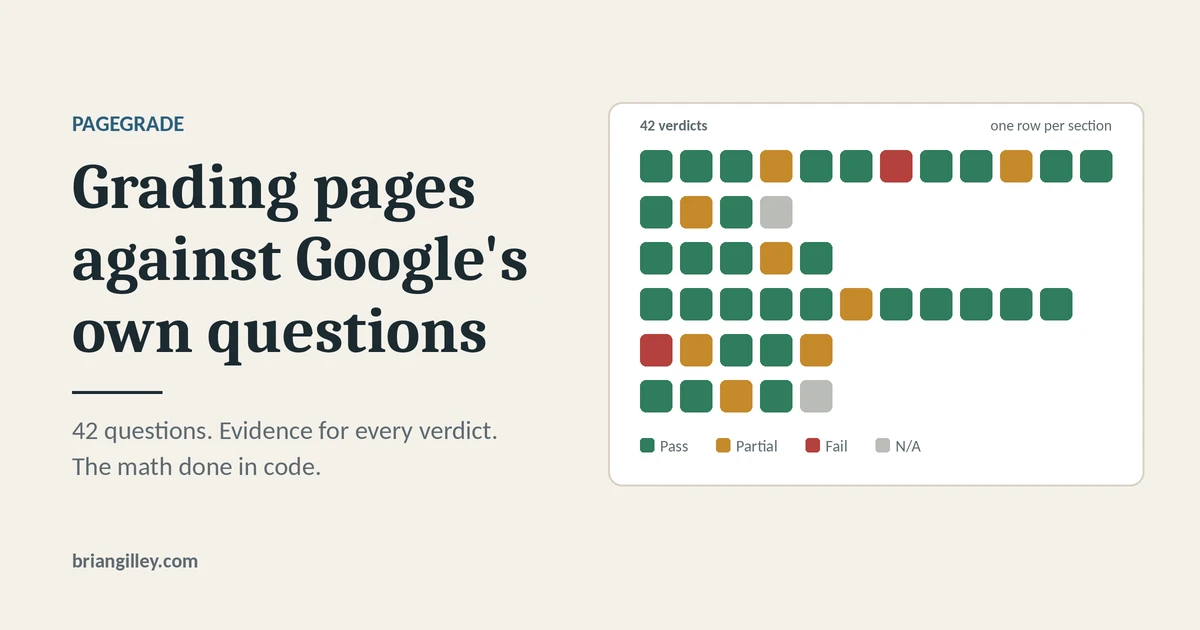
PageGrade is a page grader I built to answer one question about a URL – how well does this page hold up against what Google says it rewards? You give it a URL, it renders the page, pulls Search Console data, and returns a report that grades the page on 42 questions, each with a verdict and the evidence behind it.
It started as a 37-question audit I ran by hand on a large programmatic directory site. I turned it into a tool I now run on client sites, and added a topicality section based on what came out of the DOJ v. Google antitrust case.
TL;DR
- PageGrade scores a page against Google’s helpful content questions, five AI extractability checks, and five topicality checks built from trial evidence.
- Search Console data appears next to the score as signals, but it never changes the score. Navboost and Q* can’t be measured from outside Google, and the report says so.
- Claude judges each question and cites evidence. The math happens in code, so every point can be checked.
What PageGrade grades
The rubric has six sections. The first four come straight from Google’s helpful, reliable, people-first content guidance, which lists self-assessment questions about content quality, expertise, and search-engine-first warning signs. Split into individual checks, that’s 32 questions.
| Section | Questions | Where it comes from |
|---|---|---|
| 1. Content and quality | Q1 to Q12 | Google’s self-assessment questions |
| 2. Expertise | Q13 to Q16 | Google’s self-assessment questions |
| 3. People-first | Q17 to Q21 | Google’s self-assessment questions |
| 4. Avoid search-engine-first content | Q22 to Q32 | Google’s warning signs, reverse-scored |
| 5. AI extractability | Q33 to Q37 | My addition, not Google’s |
| 6. Topicality | Q38 to Q42 | My addition, based on trial evidence |
Section 5 covers what answer engines need to pull a clean answer: the answer in the first sentence, the key facts in the top third of the page, facts in HTML text instead of images, sections that make sense on their own, and a real freshness signal. Google doesn’t publish these as questions, so the report labels them as my addition.
Every question gets PASS, PARTIAL (half credit), FAIL, or N/A. Section 4 is reverse-scored, so a warning sign that’s absent counts as a pass. N/A is only allowed when a question can’t apply, and its weight moves to the other questions in the same section so the section keeps its full share. The total maps to a letter grade: A is 90 to 100, down to F below 60.
Where the antitrust trial evidence fits into the tool
Section 6 comes from two documents entered as exhibits in the 2025 remedies hearing of U.S. v. Google: notes from a call with Google engineer HJ Kim and notes from a call with Pandu Nayak. Kim’s notes describe three high-level buckets behind Google’s final ranking score:
- Topicality (T*), built mainly from the ABC signals: Anchors (links pointing to a page), Body (the terms in the document), and Clicks (historically, how long a user stayed on a page before returning to the results).
- Navboost, which Nayak’s notes describe as counts of how often users click a document for a query, split by location and device, using the most recent 13 months of data.
- Quality (Q*), a mostly static, mostly site-level measure that Kim’s notes tie to trustworthiness.
Only part of that can be judged from a single page, so PageGrade splits it. What the page itself shows gets scored. What needs Google’s data gets shown in a Signals panel with a label, and never touches the score.
| Trial signal | What PageGrade does | Scored? |
|---|---|---|
| Body | Q38 to Q40 and Q42: title and H1 match, query terms in the first 100 words, headings cover the sub-intents, scope is stated and consistent | Yes |
| Anchors, internal | Q41: anchor text on parent pages and the home page that link to this page | Yes |
| Anchors, external | Not measured in v1 | No |
| Clicks and Navboost | CTR gap: the page’s CTR against the property’s own median CTR at the same position | No, shown only |
| Q* | Branded vs. non-branded impression share for the whole property, labeled a weak proxy | No, shown only |
Two caveats matter here. These are interview notes, not documentation, and they say nothing about how much each bucket weighs. And Search Console clicks aren’t the data Navboost uses. The CTR gap is the closest honest signal available, not a Navboost score.
How a run works
The goal was one URL in, one report out, with nothing to upload or export. A run goes through eight steps:
- Sign in with Google once. PageGrade asks for read-only Search Console access and stores a refresh token, so later runs don’t ask again.
- Enter a URL and, optionally, a target query. If you skip the query, the page’s top Search Console query fills in.
- Capture. Playwright opens the page in a real browser, takes a full-page screenshot, finds the content blocks, and crops each one.
- Extract. It pulls the head tags, headings, first 100 words, and the anchor text on parent pages that link to this URL.
- Detect the page type. JSON-LD schema decides first. If there isn’t any, a scoring check looks at URL patterns, listing cards, bylines, prices, and name, address, and phone details.
- Pull Search Console data for the matching property: the last 12 months of queries, the CTR gap, query drift, and brand share.
- Grade. Claude gets the rubric, the page-type notes, the extract, and the screenshots, then returns a verdict and one line of evidence for every question. The response is checked against a strict JSON format and retried once if it fails.
- Score. Code calculates the score from the verdicts and the page type’s section weights.
Step 8 matters more than it looks. Language models are good at judging whether a heading covers a sub-intent and bad at adding up 42 weighted numbers. Keeping the arithmetic out of the model means the score is the same every time the verdicts are the same.
Four page types, one rubric
The original audit was built for directory pages, and a rubric tuned for those grades a blog post unfairly. A byline matters on an article and means little on a listing page. So PageGrade keeps one shared rubric and layers a small file on top for each page type: article, programmatic listing, product or service, and local business.
Each type file sets three things: the section weights, the questions that are N/A by design for that type, and the sub-intents Q40 checks the headings against. If detection picks the wrong type, you can override it and re-run the grade under the right type.
Here’s an illustrative example of how Q42 (scope is stated and consistent) plays out on a local business page:
- Before: A page titled “Water Heater Repair in Durham” opens with two paragraphs of company history. The only mention of Durham is in the title, and a footer lists 20 service towns. Verdict: PARTIAL. The scope is in the title, but the body never commits to it.
- After: The first sentence says the company repairs and replaces water heaters in Durham and Chapel Hill, the H2s follow that scope, and the service-area list moves lower on the page. Verdict: PASS.
The fix is small, and it helps the reader first: someone in Durham knows within one sentence they’re in the right place.
Reading the report
The report opens with one plain-language sentence on what’s holding the page back, then the score and letter grade. Below that:
- Section scores shown as earned and possible points, so anyone can follow the math.
- Per-question verdicts with one line of evidence each: a quoted phrase, a missing element, or where something sits on the page.
- Block findings that tie each verdict to the screenshot crop it refers to.
- Fixes, each with an effort size (S, M, or L), a “done when” condition you can check, and whether the fix belongs in the template, the content pipeline, or the single page.
- The Signals panel, with every row marked Measured or Not measured.
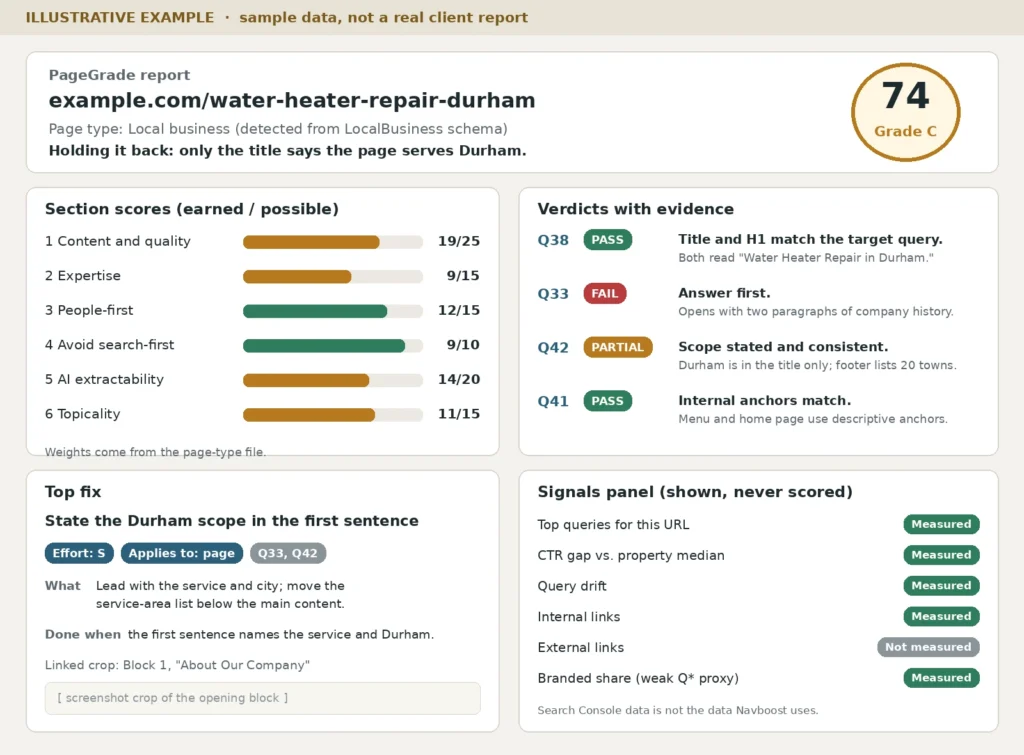
Illustrative example with sample data, not a real client report.
The “applies to” field earns its keep on programmatic sites. A Section 6 failure on one city page is usually a template failure on every page built from that template, and the fix list says so.
What’s under the hood
I’m an SEO, not a full-time developer, so I picked a plain stack and had Claude Code build it from a phased spec. Each phase ended with a pass/fail check, so I saw something working before the next phase started.
| Piece | Job |
|---|---|
| Next.js and TypeScript | The app: a landing page, the grade form, and the report |
| Auth.js with Google sign-in | Read-only Search Console access |
| Playwright (Chromium) | Rendering, screenshots, and block crops |
| Claude, through Anthropic’s API | Grading each question against the rubric |
| Google Search Console API | Queries, clicks, impressions, CTR, and position |
| Prisma and SQLite | Runs, results, and screenshot records |
| Docker on Railway | Hosting, since Playwright needs a full browser in the container |
The rubric lives in markdown files, not in code. When I want to reword a question or change a page type’s weights, I edit a text file instead of touching the code.
What it doesn’t do
PageGrade grades one URL at a time. It doesn’t pull backlink data, crawl a whole site, or export PDFs. And a good grade isn’t a ranking promise or a guarantee of AI citations. It tells you how well a page lines up with what Google has said it wants, and where it falls short.
If you’re building your own grader
Three decisions did the most for PageGrade, and they work in any grader, vibe-coded or not:
- Make the model show evidence for every verdict. A PASS with no quote or location behind it can’t be checked, so it can’t be trusted.
- Do the math in code. Let the model judge and let code count.
- Keep observed data apart from the score. Search Console numbers are useful context, but folding them into a content score mixes up what the page says with how searchers responded to it.
If you want to test the idea before building anything, take one important page and grade it by hand on the five Section 6 questions. It’s a quick way to see whether the title, the opening, the headings, and the links pointing at the page all agree on what it’s about.